
You drop in the sources. An agent writes the wiki.
Paste a URL or upload a PDF. The agent reads it, writes a page of what matters, links it to the pages it touches, and updates the overview. Cursor, Claude Code, Claude.ai and ChatGPT reach the same wiki over MCP: reading with a Reader credential, writing only with a separately scoped Librarian credential. Nothing stays buried in a chat thread.
Runs with Docker Compose and PostgreSQL on infrastructure you control. A model provider key is only needed for the optional web agent.
Accounts are invitation-only: the first Admin is created during setup and invites everyone else. Already invited? Sign in on your instance.
Watch the short tour
This is Andrej Karpathy’s LLM Wiki pattern — three folders, three operations, a Markdown wiki maintained by an AI — implemented for self-hosting and wired to the agents you already use. Read his note · How we implement it
What happens when a source lands
This is not a pile of notes that an AI fishes through at question time. When a source arrives, the agent reads all of it, writes a summary page, opens a page for each new concept or person, flags where it contradicts what is already there, and updates the overview and the log. Every later question is answered from pages that already exist — with the page named.
[2026-09-05] ingest | Ten simple rules for structuring papers
- Source:
raw/sources/ten-simple-rules-structuring-papers.md - Added the source summary:
wiki/sources/ten-simple-rules-structuring-papers.md - Added a concept page:
wiki/concepts/scientific-writing.md - Updated the overview:
wiki/index.md - Appended an entry:
wiki/log.md
When the second source lands, it doesn’t start over
The first article produced the page “Google Taiwan”. Nine minutes later a second report went in; the agent found that page, added two sections and seven items, and 16 links — v1 became v2, and v1 is still there. The more sources, the richer every page. That is why a compiled wiki compounds and a retrieval tool does not.
“Google Taiwan” version 1: an introduction and one section on facilities
“Google Taiwan” version 2: the same page with the Changhua data centre and a water section added
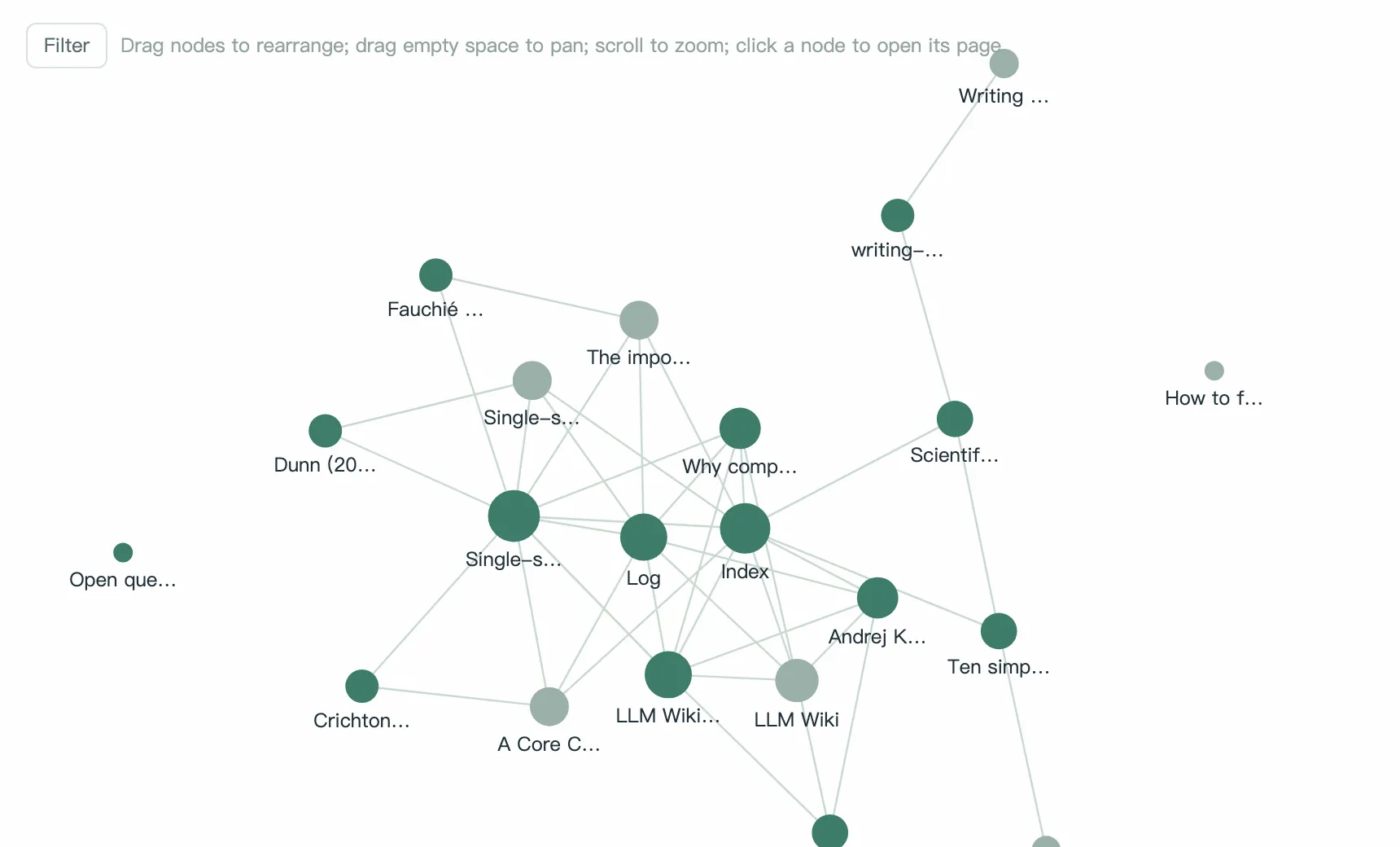
This demo wiki: 11 sources → 39 pages → 216 links.
Knowledge grows into a graph
Every [[link]] and [@citation] on a page is an edge. The more sources arrive, the more obvious the hub pages become — which topics several sources already support, and which ones are still hanging off to one side. The timeline replays how the wiki grew.
Three steps, done on day one
Add a source
Paste a URL, upload a PDF or Word file, paste text, or import a .bib. Sources live in raw/ and are never edited.
Let the agent compile (Ingest)
Press Copy prompt for remote agent and hand the source to your connected Librarian agent, in Cursor or Claude Code for example. Optionally, the local AI in the browser does the same with your own API key, in about a minute.
Ask, browse, lint
Ask (Query) and every answer names its pages; keep a good answer as a wiki page. Lint finds orphan pages, broken links and contradictions.
The agents you already use can work with this wiki
There is an MCP server built in. Cursor and Claude Code use a token; Claude.ai and ChatGPT connect by signing in (OAuth, read-only). Connected agents can discover the projects available to their credential and work within its permissions. Write tools are available only to Librarian credentials with explicit write grants, and the server checks every call. Two agents editing the same page won’t clobber each other — the later writer gets the current version back.
{
  "mcpServers": {
    "central-llm-wiki": {
      "url": "https://orakel.marcobartsch.de/mcp",
      "headers": {
        "Authorization": "Bearer clw_live_… (generated in Settings)"
      }
    }
  }
}For researchers: citations that build their own reference list
Paste a paper’s URL or DOI and the bibliography fills itself in (Crossref, arXiv, PubMed). Write [@citekey] on a wiki page; it renders as (Author, Year), links to the source, and a reference list grows at the bottom. BibTeX and CSL-JSON in and out. The researcher template tells the agent to cite this way.
![A wiki page: [@fauchie2023the] in the text renders as (Fauchié, 2023) and a reference list is generated at the bottom](/landing/en/citations.webp)
Self-hosted by design
- Docker Compose starts the app and PostgreSQL, on a plain Docker host behind HTTPS or in Coolify.
- You manage invitations, roles, projects, the database, encryption keys and backups.
- Pick the AI provider for the optional web agent yourself; usage is charged directly by that provider.
Open source under Apache-2.0. Find the code and deployment guide on GitHub
Open source. Your data stays yours.
The code is on GitHub under Apache-2.0. Your wiki lives in your own deployment; export it any time as an Obsidian-compatible Markdown zip, and the bibliography as .bib. The interface is available in German and English; write in any language.
Common questions
- Do I need an API key?
- Not necessarily. If you use Cursor, Claude or another MCP client, its agent runs with the model provider configured there. Only the optional web agent in the browser needs an API key, configured in Settings.
- How do I get an account?
- There is no open sign-up. Whoever runs an instance creates the first Admin during setup; Admins invite others as Admin or Editor and choose which projects they can read or edit. Setup guide
- What if the agent gets it wrong?
- Every write keeps a version; restore with one click. You can also edit the page, correct it in chat, or write the rule into schema/ so it follows it next time.
- How is this different from NotebookLM?
- NotebookLM re-reads your sources every time you ask; Central LLM Wiki compiles them into pages that stay; Cursor and Claude can read them, and write them with a Librarian credential. Full comparison
- Can I take my data out?
- Any time. One click in Settings exports a Markdown zip and a .bib, and everything already lives in your own PostgreSQL database; the code is open source.
You drop in the sources. An agent writes the wiki.
Runs with Docker Compose and PostgreSQL on infrastructure you control. A model provider key is only needed for the optional web agent.
Accounts are invitation-only: the first Admin is created during setup and invites everyone else. Already invited? Sign in on your instance.